Understanding NAT type in gaming is crucial for any American gamer seeking a seamless online experience. This detailed guide explains what NAT gaming truly involves, how it impacts your multiplayer connections, and why it matters for voice chat and party invites. Discover the differences between Open, Moderate, and Strict NAT types, learning how each affects your ability to connect with other players across popular platforms like Xbox, PlayStation, and PC. We provide clear, actionable insights into troubleshooting common NAT issues, including practical solutions like port forwarding, UPnP configuration, and addressing double NAT scenarios. You'll gain valuable knowledge to optimize your network settings, ensuring smoother gameplay, reduced lag, and more reliable online interactions. This information empowers you to fix connectivity problems, enhance your gaming sessions, and navigate the complexities of network address translation with confidence.
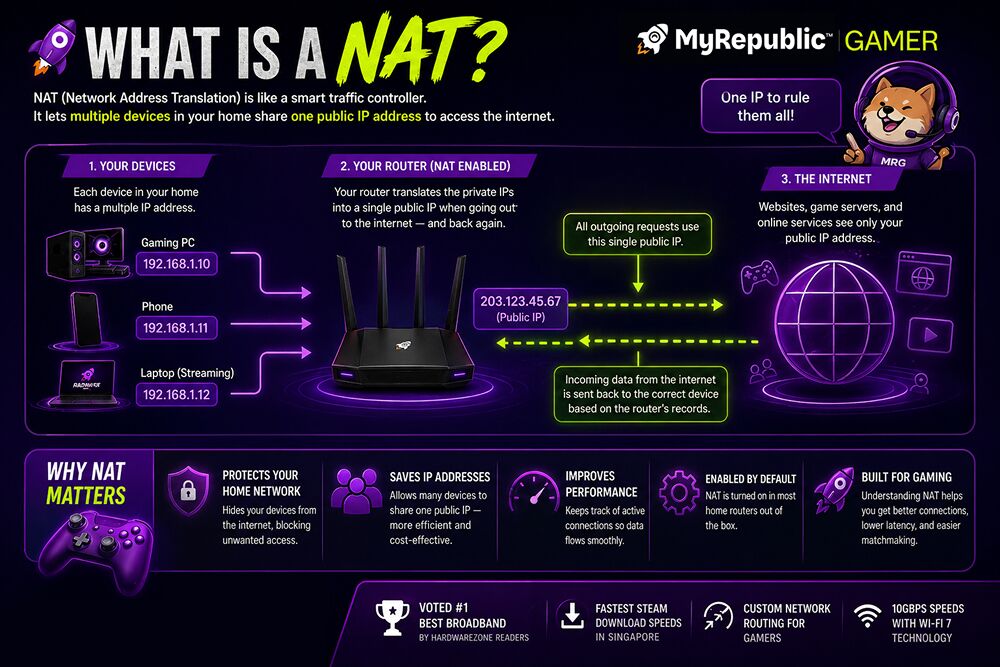
- What exactly is NAT type in gaming? - NAT, or Network Address Translation, allows multiple devices on a private network to share a single public IP address when connecting to the internet. For gaming, it determines how easily your console or PC can establish connections with other players' devices and game servers, influencing multiplayer stability and voice chat functionality.
- Why is an Open NAT type considered the best for gaming? - An Open NAT type provides the least restrictive connection, allowing your gaming device to connect directly with most other players and game servers without issues. This reduces connection failures, improves voice chat quality, and often leads to smoother matchmaking and a more reliable multiplayer experience in online games.
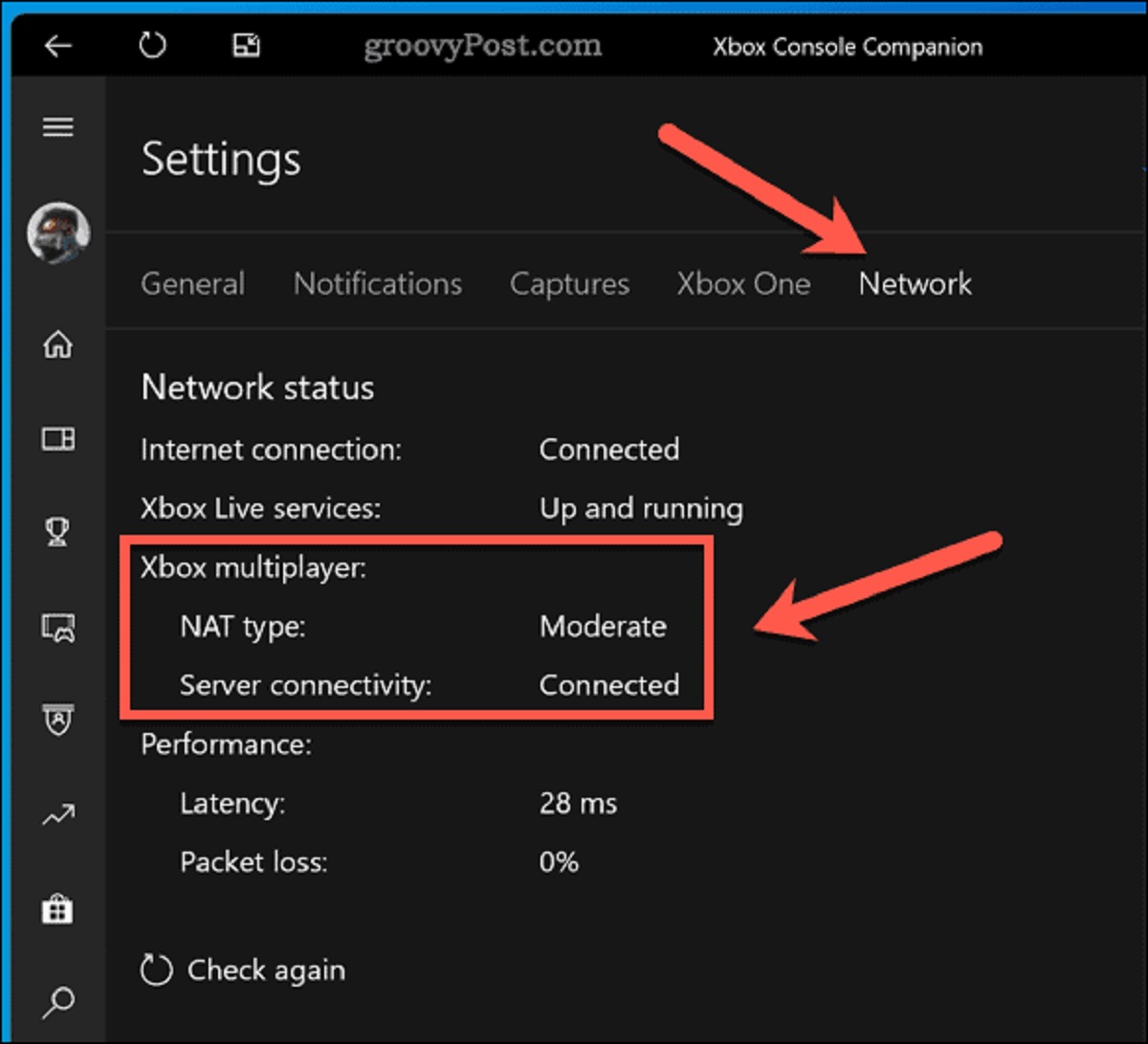
- How can I check my current NAT type? - You can usually check your NAT type directly through your gaming console's network settings (e.g., Xbox, PlayStation) or within the network configuration utility of your PC. These settings often display your current NAT status, such as Open, Moderate, or Strict, helping you understand your connection's limitations.
- What are common solutions for a Strict or Moderate NAT type? - Common solutions include enabling UPnP (Universal Plug and Play) on your router, manually setting up port forwarding for specific game ports, or placing your gaming device in a router's DMZ (Demilitarized Zone). These methods aim to open necessary communication pathways for better game connections.
- Does NAT type affect game performance or ping? - While NAT type primarily impacts connectivity and the ability to join or host games, an overly strict NAT might indirectly contribute to perceived lag or connection instability due to difficulties establishing direct peer-to-peer connections. However, it's not a primary factor for ping, which is mainly determined by distance and internet speed.
- Is it safe to enable UPnP for gaming? - Enabling UPnP can simplify network configuration for gaming by automatically opening ports, but it carries potential security risks if not managed carefully. Malicious software could exploit open ports without your knowledge. Many gamers opt for manual port forwarding for better control and security, especially if UPnP causes issues.
- What is 'Double NAT' and how do I fix it? - Double NAT occurs when two routers on your network are both performing NAT, often seen with a modem/router combo from your ISP connected to your personal router. This creates an extra layer of translation that can worsen NAT issues. Fixing it usually involves putting one device into bridge mode or disabling NAT on one of them.
What does NAT type mean in gaming?
NAT type in gaming refers to how your network facilitates connections between your device and other players or game servers. It dictates your ability to connect for multiplayer, affecting matchmaking, voice chat, and party invites. An Open NAT offers the best connectivity for a smooth online experience.
How do I change my NAT type to Open?
You can change your NAT type to Open primarily through your router settings. Common methods include configuring port forwarding for specific game ports, enabling Universal Plug and Play (UPnP) on your router, or, in some cases, placing your gaming device in a Demilitarized Zone (DMZ) for maximum openness.
Is a Strict NAT type bad for gaming?
Yes, a Strict NAT type is significantly detrimental to gaming. It severely restricts your online interactions, making it difficult to join friends' parties, host games, or even connect with many players. This often leads to frustrating connection errors and limits your multiplayer experience.
What is the difference between Open, Moderate, and Strict NAT?
Open NAT allows unrestricted connections to any other NAT type. Moderate NAT permits connections to Open and Moderate types, but struggles with Strict. Strict NAT is the most restrictive, often only connecting to Open NAT users, severely limiting online interaction. Open is ideal for flawless gaming.
Does NAT type affect ping or lag?
NAT type primarily influences connectivity and the ability to establish direct connections, rather than directly affecting ping or latency. While a restrictive NAT can cause connection delays or failures, leading to perceived lag, core ping is more determined by internet speed and geographical distance to game servers.
Should I use UPnP or Port Forwarding for gaming?
Both UPnP and Port Forwarding can improve your NAT type for gaming. UPnP is simpler, automatically opening ports, but port forwarding offers more control and is generally considered more secure as you manually specify which ports open. Many gamers prefer port forwarding for dedicated gaming setups.
Can my ISP change my NAT type?
Your ISP can influence your NAT type, especially if they employ Carrier-Grade NAT (CGN) on their network. If you suspect CGN or other ISP-level restrictions, contacting them to inquire about your network configuration or requesting a dedicated public IP address might help improve your NAT type for gaming.
What is NAT Type in Gaming and How Does it Work?
For gamers across the United States, a smooth online experience often feels like a golden ticket. Yet, many encounter frustrating connection problems, ranging from dropped games to difficulty joining friends' parties. Often, the culprit is something called NAT, or Network Address Translation. This technology, fundamental to how your home network operates, significantly influences your online gaming connectivity. Understanding what NAT type you have and how it functions can make a world of difference, turning connection headaches into hassle-free play.
Network Address Translation plays a vital role in allowing multiple devices within your home to share a single public internet protocol address provided by your internet service provider. Imagine your router as a busy receptionist for your entire home network. When your gaming console, PC, or smartphone wants to access the internet, it tells the router. The router then communicates with the outside world using its one public IP address, translating requests back and forth. This translation process is usually efficient, but for the complex, direct connections often required by online games, it can introduce challenges.
This guide will demystify NAT for you, explaining its various types and the practical steps you can take to optimize your network for gaming. We will cover everything from identifying your current NAT status to implementing solutions that can improve your multiplayer sessions, ensuring you spend more time playing and less time troubleshooting.
Understanding Network Address Translation NAT
NAT serves a critical purpose in modern networking: it conserves public IP addresses while allowing numerous devices on a private network to access the internet. Every device in your home gets a private IP address, which is only visible within your local network. When any of these devices requests information from a website or a game server, the router translates that device's private IP into the router's single public IP address. The internet sees only the public IP, effectively hiding your internal network structure.
The process works like a charm for general web browsing or streaming video. However, online gaming, particularly peer-to-peer connections found in many multiplayer titles, requires a more direct line of communication. Your gaming device needs to establish a direct link with other players' consoles or PCs to send and receive game data quickly. When the router is constantly translating addresses and deciding which internal device should receive incoming data, it can introduce barriers that prevent these direct connections from forming properly.
This challenge intensifies when multiple players try to connect to each other. If your router cannot efficiently direct incoming game data to your specific console or PC, it can lead to communication breakdowns. This results in issues like voice chat not working, being unable to join specific lobbies, or experiencing frequent disconnections, directly impacting your ability to enjoy competitive or cooperative online play. Grasping this core function of NAT helps explain why its configuration is so vital for gamers.
The Different NAT Types for Gamers
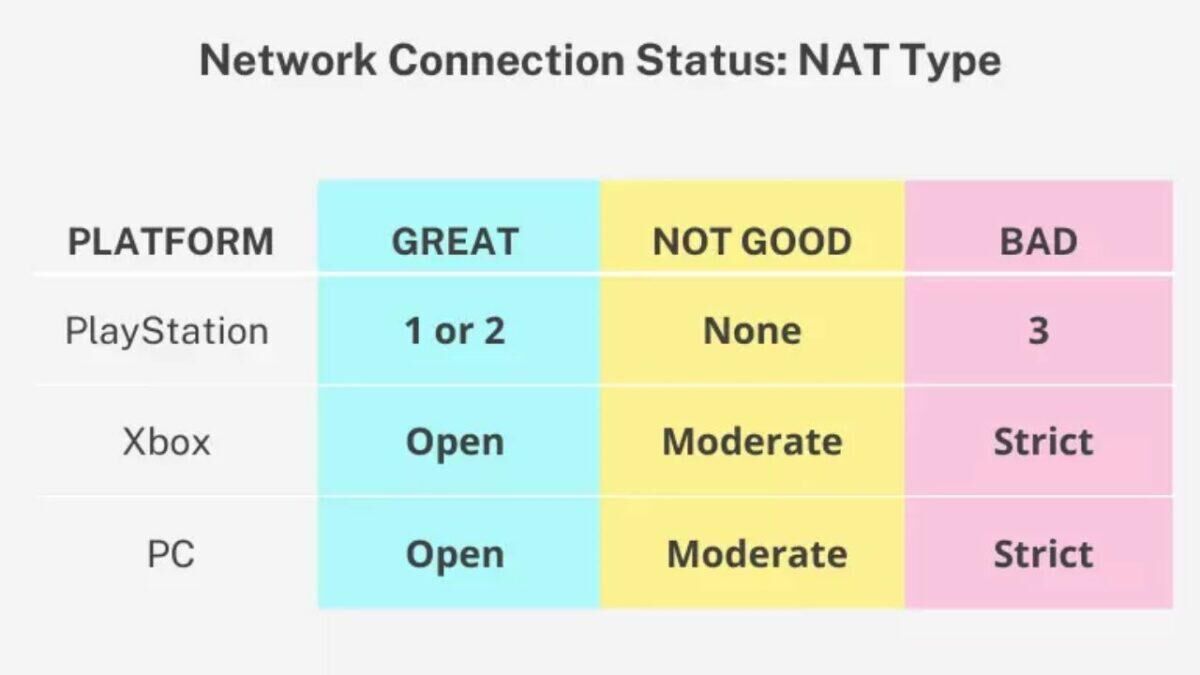
When you check your network settings on an Xbox, PlayStation, or PC, you'll often see your NAT categorized into one of three main types: Open, Moderate, or Strict. Each type indicates how easily your gaming device can communicate with other players' systems and game servers, directly influencing your online gaming experience.
An **Open NAT** is the most desirable type for any online gamer. With an Open NAT, your device can connect to any other NAT type without restriction. This configuration allows you to join game sessions, host games, and use voice chat with nearly anyone, ensuring the broadest possible range of connections. Players with Open NAT rarely experience connection issues related to NAT, enjoying smooth matchmaking and reliable multiplayer interactions across various titles and platforms. This freedom simplifies the process of teaming up with friends or finding opponents online, making it the ideal setting for competitive and casual play alike.
A **Moderate NAT** represents a somewhat restricted connection. While you can typically connect with players who have an Open or Moderate NAT, you might struggle to join games hosted by players with a Strict NAT. This restriction can cause problems like being unable to hear specific players in voice chat, difficulty joining certain game lobbies, or experiencing frequent party disconnections. A Moderate NAT is a common scenario, often manageable for many games, but it introduces limitations that can hinder a truly seamless online gaming experience, especially when trying to link up with friends who have more restrictive setups.
Finally, a **Strict NAT** presents the most significant connectivity challenges. If your network has a Strict NAT, you can often only connect with players who have an Open NAT. This severely limits your matchmaking options and makes it incredibly difficult to join or host games with friends, particularly if they also have Moderate or Strict NAT types. Voice chat frequently fails, and you might encounter persistent error messages preventing you from joining multiplayer sessions altogether. A Strict NAT can quickly turn online gaming into a frustrating endeavor, making solutions to improve it a high priority for affected players.
How NAT Type Affects Your Online Gaming Experience
The type of NAT configured on your network directly translates to the quality and reliability of your online gaming sessions. This impact is not just theoretical; it manifests in tangible ways that can determine whether a gaming evening is filled with fun or frustration. Gamers in the USA, playing everything from fast-paced shooters to immersive role-playing games, rely heavily on stable, low-latency connections, and your NAT type plays a significant role in achieving this.
Consider a multiplayer game where players connect directly to each other, often called peer-to-peer (P2P) networking. With an Open NAT, your console or PC can establish these P2P connections effortlessly. You join lobbies quickly, your voice chat works without a hitch, and you can invite friends to your party or join theirs with minimal fuss. This ideal scenario means you spend more time playing and less time staring at loading screens or error messages. Many competitive games thrive on this direct communication, and an Open NAT ensures you are always ready for action.
However, when you have a Moderate or Strict NAT, the issues become apparent. You might find yourself unable to join a friend's party, even if they're playing the same game. Voice chat could be choppy or non-existent, making team coordination nearly impossible. In some cases, matchmaking might take an unusually long time, or you could be limited to playing only with a small subset of players who have compatible NAT types. For example, an Xbox player with a Strict NAT might only be able to connect with players who have an Open NAT, severely limiting their multiplayer options. These problems arise because the router's NAT function struggles to properly route the necessary data packets for direct communication between your device and other players' systems, introducing delays or outright blocking the connection attempts. This directly undermines the immersive and social aspects of online gaming.
Improving Your NAT Type: Practical Solutions
Facing a Moderate or Strict NAT type does not mean your online gaming days are over. Several effective strategies exist to improve your NAT type, ultimately leading to a more stable and enjoyable gaming experience. Implementing these solutions often involves making adjustments within your router's settings. Always consult your router's manual or manufacturer's website for specific instructions, as menu layouts vary between brands.
One of the most common and effective methods to improve your NAT type is **Port Forwarding**. This process involves manually telling your router to send specific types of internet traffic to a particular device on your network. Online games often use specific port numbers for their communication. By forwarding these ports directly to your gaming console or PC, you bypass the router's general NAT filtering for game-related data. For instance, if a game requires UDP port 3074, you would configure your router to direct all incoming traffic on that port directly to the static IP address of your Xbox or PlayStation. This explicit instruction allows game data to flow freely, significantly reducing connectivity issues and often resulting in an Open NAT. While it requires a bit of initial setup, port forwarding offers a reliable and secure way to optimize your gaming connection.
**Universal Plug and Play (UPnP)** offers a more automated approach. When enabled on your router, UPnP allows devices on your network, like your gaming console, to automatically request and open the necessary ports they need for communication. This eliminates the need for manual port forwarding, making it convenient for users who prefer a hands-off setup. Many gamers find UPnP a simple solution to achieve an Open NAT. However, it is important to note that some network security experts caution against UPnP due to potential vulnerabilities, as any device on your network could theoretically open ports without your explicit approval. For most home users focusing on gaming, UPnP is a widely used and often effective option, but understanding its implications is always a good idea.
For more advanced users or persistent issues, placing your gaming device in a **Demilitarized Zone (DMZ)** is another option. A DMZ essentially exposes a specific device directly to the internet, bypassing almost all of the router's firewall protections. This almost guarantees an Open NAT, as there are virtually no restrictions on incoming or outgoing traffic for that device. While highly effective for connectivity, the DMZ option comes with significant security considerations. Because the device is directly exposed, it becomes more vulnerable to external threats. Therefore, using a DMZ is generally recommended only as a last resort and often only for dedicated gaming systems that do not store sensitive personal information. Always ensure your gaming device's software is up-to-date and secure if you choose this route.
Troubleshooting Common NAT Gaming Problems
Even after attempting the primary solutions, gamers sometimes encounter persistent NAT-related issues. One common scenario is what's known as a "double NAT" configuration. This often occurs when you have two routers on your network, such as an ISP-provided modem-router combo connected to your own personal Wi-Fi router. Each router performs Network Address Translation, creating two layers of translation. This double layer can complicate port forwarding and UPnP, making it very difficult for game data to find its way to your device. To fix this, you generally need to put one of the devices into "bridge mode" or disable its NAT functionality, allowing only one router to handle the primary NAT duties for your network.
Before diving into complex solutions, always perform basic network troubleshooting. Start by restarting your router and modem. A simple reboot can often clear temporary glitches affecting your NAT type. Next, ensure your router's firmware is up to date. Manufacturers regularly release updates that can improve performance, security, and sometimes even NAT handling. Check your router's settings for a firmware update option or visit the manufacturer's website. Also, confirm that your gaming console or PC has a static IP address on your local network, especially if you are using port forwarding. Dynamic IP addresses can change, causing your carefully configured port forwards to stop working.
If, after trying these steps, you still struggle with a Strict or Moderate NAT type, reaching out to your Internet Service Provider (ISP) might be necessary. Some ISPs implement their own NAT configurations, sometimes called Carrier-Grade NAT (CGN), which can make it impossible for users to achieve an Open NAT through their own router settings. Explain your gaming connectivity issues and ask if they can assist in configuring your modem/router, provide you with a public IP address, or offer advice on bypassing any CGN they might employ. While not all ISPs offer direct solutions, they can often provide valuable insights or adjustments from their end that can significantly improve your NAT type for gaming.
Frequently Asked Questions About NAT and Gaming
What does NAT type mean in gaming?
NAT type in gaming refers to how your network handles connections between your device and other players or game servers. It dictates how easily your console or PC can communicate directly with others online, influencing multiplayer stability, matchmaking speed, and voice chat functionality. An Open NAT is ideal for seamless interactions.
How do I change my NAT type to Open?
To change your NAT type to Open, you can configure your router using methods like port forwarding, enabling Universal Plug and Play (UPnP), or placing your gaming device in a Demilitarized Zone (DMZ). Port forwarding allows specific game data to pass through directly, while UPnP automates port management. Always consult your router's manual.
Is a Strict NAT type bad for gaming?
Yes, a Strict NAT type is generally bad for gaming. It severely limits your ability to connect with other players, often preventing you from joining friends' parties, experiencing frequent disconnections, and encountering issues with voice chat. It restricts direct communication, making many online multiplayer experiences frustrating or impossible.
What is the difference between Open, Moderate, and Strict NAT?
Open NAT offers unrestricted connections, allowing direct communication with any other NAT type. Moderate NAT has some restrictions, making it harder to connect with Strict NAT players. Strict NAT is the most restrictive, often limiting connections only to players with an Open NAT, severely hindering multiplayer interaction.
Does NAT type affect ping or lag?
NAT type primarily affects connectivity and the ability to establish direct connections, not raw ping or lag directly. While a restrictive NAT can introduce connection delays or prevent certain game data from flowing efficiently, leading to perceived lag, actual ping is more dependent on internet speed and distance to game servers.
Should I use UPnP or Port Forwarding for gaming?
Both UPnP and Port Forwarding can improve NAT type. UPnP is easier to set up as it automatically opens ports, but some security experts suggest manual port forwarding offers more control and potentially greater security by only opening specific, necessary ports for your games.
Can my ISP change my NAT type?
Your ISP can indirectly affect or change your NAT type, especially if they use Carrier-Grade NAT (CGN), which makes achieving an Open NAT difficult. You can contact your ISP to inquire about your network configuration, request a public IP address, or seek assistance with router settings if you're unable to improve your NAT type independently.
NAT type explanation for gamers, open NAT advantages, moderate NAT connectivity problems, strict NAT restrictions, port forwarding guide gaming, UPnP configuration for consoles, double NAT solutions, improve gaming connection stability, NAT troubleshooting tips, network address translation in online gaming
32


Gamescom 2026 Alle Games Aussteller In Der Bersicht NAT Games NAT Games Gamescom 2026 . What Is A NAT NAT Types Explained And Why Your Games Are Lagging What Is A NAT . United States National 2026 Calling Minneapolis Flesh NATS 2026 Header 2 720x405 . A NAT Esports A Mais Nova Organiza O No Game Changers Brasil 2026 DZ . 10 Much Awaited Games Set To Launch In 2026 Games To Launch 2026 2048x1289



2026 In Gaming Releases What Are We This Year Blogs 2026 Gaming 2 . NAT Games 2026 Company Profile Team Funding Competitors Tracxn Nat Games Overview. Next Level Gaming The Most Anticipated Games Of 2026 You Can T Miss Gemini Generated Image . Top 10 Most Anticipated Games Of 2026 What To Watch Out For TVN GAMES IN 2026 . The Most Anticipated Games Of 2026 That Gamers Can T Wait For 20250822 Most Anticipated Games Of 2026




Here Are 5 BIG GAMES Coming In 2026 What New Games In 2026 Are You Media. Where Is Gaming Going In 2026 Beyond YouTube . State Of Gaming 2026 Mobile PC Console Data SoG SEO Image R2 . 20 Most Anticipated Video Games Of 2026 Page 18 1200x675 . 2026 Upcoming Games And Game Release Dates Guide 2026 Upcoming Games Release Dates



The State Of Gaming In 2026 Insights Into Revenue Growth And Trends Og Image.webp. Gaming In 2026 What S In Store In The Post RMG Era SOC 100 . Topbos77 Gaming Trends In 2026 The Hottest Moves In Gaming Right Now Hq720 2026 01 . Diese Videospiele Erscheinen In Der 18 NAT Games KW 18 2026 . Next Level Gaming The Most Anticipated Games Of 2026 You Can T Miss Gemini Generated Image





Gaming User Acquisition Trends 2026 The Hard Truth Behind The ChatGPT Image Feb 11 2026 05 37 36 AM . Top Gaming Events Of 2026 Where The Future Of Game Development Is Top Main Gaming Events 2026 Img 1.original . NAT Test March 2026 Complete Step By Step Guide Key Blog . Gaming In 2026 What S In Store In The Post RMG Era Gaming Tech Outlook 2026 G3 . Best Gaming Laptops At CES 2026 RTX 5090 Options Dual Screen Picks Lenovo Legion Pro Rollable Concept




Has A Game Unveiling The Buzz Amp Whats Trending National Games 2025. Where Is The National Game 2026 Confirmed Venue Date Where Is The National Game 2026.webp. Where Is The 2026 National Game Crawler. North American Tour Series Location Announced USA Roundnet NATS. Modifying Mobile Hotspot NAT Type Steps Robots Net How To Change Nat Type Pc 1691560671

What Is A NAT NAT Types Explained And Why Your Games Are Lagging How Do Nat Types Affect Match Making . The Big Gaming Releases For 2026 Aside From GTA VI BBC News 874e1730 E641 11f0 Aae2